orderflow
 How to Automate ERP Order Entry: A Practical Guide for Distributors
ERP order automation doesn't require an 18-month IT project. Here's the framework to go live in 30 days.
++
How to Automate ERP Order Entry: A Practical Guide for Distributors
Most distributors assume that automating order entry in their ERP requires an 18-month IT project, a systems integrator, and a budget that only large enterprises can justify. This assumption is wrong, and it is keeping mid-size operations locked in a manual process that costs them money every day.
ERP order entry automation has become accessible to operations of any size. The technology exists. The connectors exist. The implementation timelines have compressed dramatically. What remains is understanding how it actually works, what it requires, and how to sequence the rollout so that it delivers results quickly rather than disappearing into a multi-year project.
What ERP Order Entry Automation Actually Means
ERP order entry automation is software that reads incoming purchase orders from any channel — email, PDF attachment, EDI, phone transcription, or customer portal — extracts the required fields, validates the data against your ERP master data, and creates confirmed order entries without a human touching the keyboard.
The output is the same as what a customer service representative would produce manually: a clean, validated order entry in your ERP with the correct customer code, item codes, quantities, pricing tier, delivery address, and requested delivery date. The difference is that the automation does it in seconds rather than minutes, at any hour, across any order volume.
The process does not eliminate the customer service role. It eliminates the data entry component of that role, which typically consumes 60 to 80 percent of a CSR’s working day in a high-volume distribution operation. The team focuses on exceptions, customer relationships, and decisions that require judgment.
The Five-Step Automation Workflow
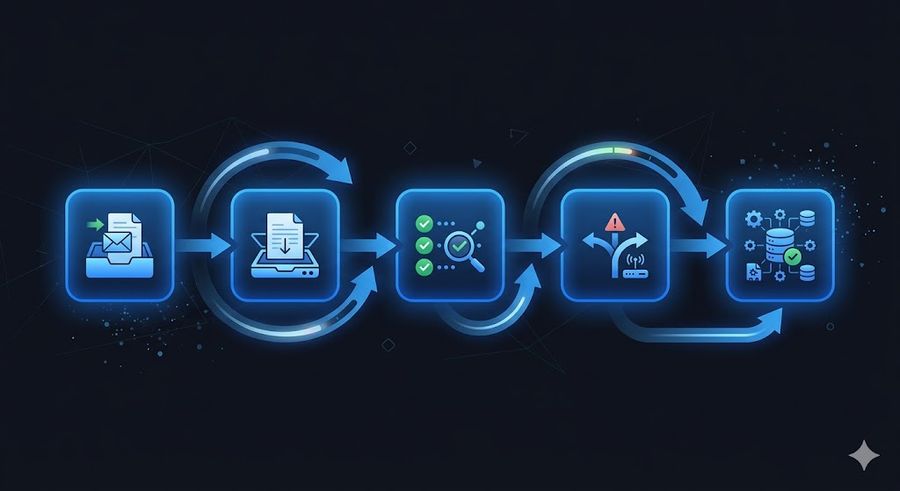
A well-designed ERP order entry automation system follows five steps.
Step 1: Ingestion.
The system monitors all order intake channels simultaneously. For most distributors, this means a dedicated order intake email inbox, direct EDI connections with larger customers, and a processing queue for scanned documents or phone orders transcribed by voice recognition. All incoming orders are captured regardless of format or source.
Step 2: Extraction.
The AI model reads the incoming document and extracts the structured data fields required for an ERP entry: customer identifier, line items with quantities and units, pricing references, delivery address, requested delivery date, and any special instructions. This extraction works across document formats — a clean PDF, a scanned handwritten form, an email with an inline order, or an EDI 850 transaction all go through the same pipeline.
Step 3: Validation.
The extracted data is validated against your ERP master data in real time. Customer codes are confirmed against the customer master. Item codes are matched — including fuzzy matching for customer-specific part numbers that differ from your internal codes. Prices are checked against the applicable pricing tier. Inventory availability is checked against current stock levels. Each validation step either passes, flags a discrepancy for review, or triggers an automated correction if the resolution is unambiguous.
Step 4: Exception routing.
Orders that pass all validation checks are submitted directly to the ERP. Orders with exceptions — unrecognized item codes, pricing discrepancies, quantities outside normal range, missing required fields — are routed to the appropriate CSR with a complete exception report showing exactly what is flagged and why. The CSR resolves the exception and approves the order in a fraction of the time it would take to process the order manually from scratch.
Step 5: Confirmation and audit trail.
Once the order is in the ERP, an order confirmation is generated and sent to the customer. Every step of the process is logged with timestamps, extracted values, validation results, and any human interventions. This audit trail satisfies compliance requirements and provides full traceability for every order.
What Your ERP Needs to Support Automation
The most common concern from operations teams is whether their ERP can support automation. In most cases, the answer is yes — the integration approach depends on what the ERP exposes.
ERPs with modern APIs (SAP, Oracle NetSuite, Microsoft Dynamics 365, Salesforce):
Integration is through direct API calls. The automation system authenticates with the ERP API, reads the master data it needs for validation, and writes confirmed order entries through the same API. This is the cleanest integration path, produces the most reliable results, and requires no changes to the ERP interface.
Older ERPs with EDI or flat file interfaces (many legacy systems):
Integration is through the EDI or flat file interface the ERP already supports. The automation system generates properly formatted EDI 850 transactions or structured flat files that the ERP accepts through its existing import processes. This works for most legacy systems without requiring any ERP modifications.
ERPs with no API and no EDI interface:
These are rare but they exist. In these cases, the integration uses a combination of database-level access and interface automation to write order data into the ERP. The implementation is more complex and the reliability is lower than API-based integration, but it is achievable for systems that provide no other access path.
The Realistic Implementation Timeline
The 18-month timeline that makes operations teams hesitate is the timeline for large enterprise ERP automation projects that involve custom development, extensive testing environments, and multi-phase rollouts. For a modern pre-built automation platform with existing ERP connectors, the timeline is different.
Days 1 to 5: Configuration.
API credentials are established and the connection to the ERP is verified. The customer master, item master, and pricing tables are synced into the validation layer. The order intake email inbox is connected to the ingestion pipeline. Initial document samples are processed to calibrate the extraction models.
Days 6 to 10: Calibration and testing.
A sample of historical orders is processed in test mode. Extraction accuracy is measured and calibrated for the specific document formats in scope. Validation rules are configured for the operation’s specific requirements — which mismatches should trigger automatic correction versus human review, what the escalation thresholds are for quantity and price variance. The exception routing workflow is configured and tested.
Days 11 to 15: Parallel processing and go-live.
Live orders are processed in parallel — the automation handles the order while the CSR processes it manually. Results are compared for one to two weeks to confirm accuracy before fully transitioning. The transition to automated processing typically happens by the end of week three for operations with standard ERP integrations.
What to Measure After Deployment
The metrics that matter for ERP order entry automation are straightforward.
Straight-through processing rate:
The percentage of orders that go from ingestion to ERP entry without any human intervention. Well-configured systems achieve 70 to 90 percent straight-through processing within 30 days of go-live, depending on the variability of the order formats in scope. This number improves over time as the models learn from exception resolutions.
Processing time per order:
Manual order entry in a distribution environment typically takes 6 to 12 minutes per order, including the time to read the PO, look up item codes, verify pricing, and key in the data. Automated processing takes 15 to 45 seconds per order, including the validation checks. For exception orders that require human review, the time is 1 to 3 minutes rather than 6 to 12.
Error rate:
The industry average for manual order entry error rates is 3 to 8 percent. Automated systems with proper validation typically achieve error rates below 0.5 percent, since every validation check that a human might skip under time pressure is applied consistently to every order.
Common Objections and the Honest Answers
Our orders are too complex to automate.
This is the most common objection and it is almost never accurate. Complexity — multiple line items, customer-specific part numbers, split delivery addresses, blanket orders with release schedules — is exactly what modern AI-based extraction is designed to handle. The operations that seem most complex often achieve the highest straight-through processing rates because the automation handles the complexity more consistently than humans do under volume pressure.
Our ERP is too old.
Legacy ERP systems are common in industrial distribution. The integration approach adapts to what the ERP supports — API, EDI, flat file, or database access. The ERP age is rarely the binding constraint.
Our team will resist the change.
The operations that manage this best involve the CSR team in the calibration process. When CSRs see that exceptions come to them with full context — instead of arriving as raw orders they must decode from scratch — and that the automation handles the volume that used to cause peak-season breakdowns, the resistance typically resolves within the first month of live operation.
How Mirage Metrics Approaches This
OrderFlow is the Mirage Metrics product built specifically for ERP order entry automation in industrial distribution. It connects to your existing ERP through direct API integration or EDI, handles the full ingestion-extraction-validation-submission workflow, and routes exceptions to your team with complete context. Deployments go live within 5 to 15 business days depending on ERP complexity. The straight-through processing rate at 30 days is typically between 75 and 90 percent for operations with standard distribution workflows.
MANUFACTURING
READY TO AUTOMATE?
Automate your order intake end-to-end
From email to ERP in seconds — no manual entry, no errors.

++
+